

Local, not locked in
Your data stays on your Mac. Domain Ledger does not use tracking and works without a mandatory cloud service.
Independent by design
Domain Ledger brings together information that would otherwise be scattered across registrar portals, password managers and notes. The app works entirely locally, does not use tracking and therefore protects your privacy.
Your data stays on your Mac. Domain Ledger does not use tracking and works without a mandatory cloud service.
Domains, credentials and technical details share one flexible structure.
Works completely offline and independently of any registrar or hosting provider – for small and large domain portfolios.
The app in action

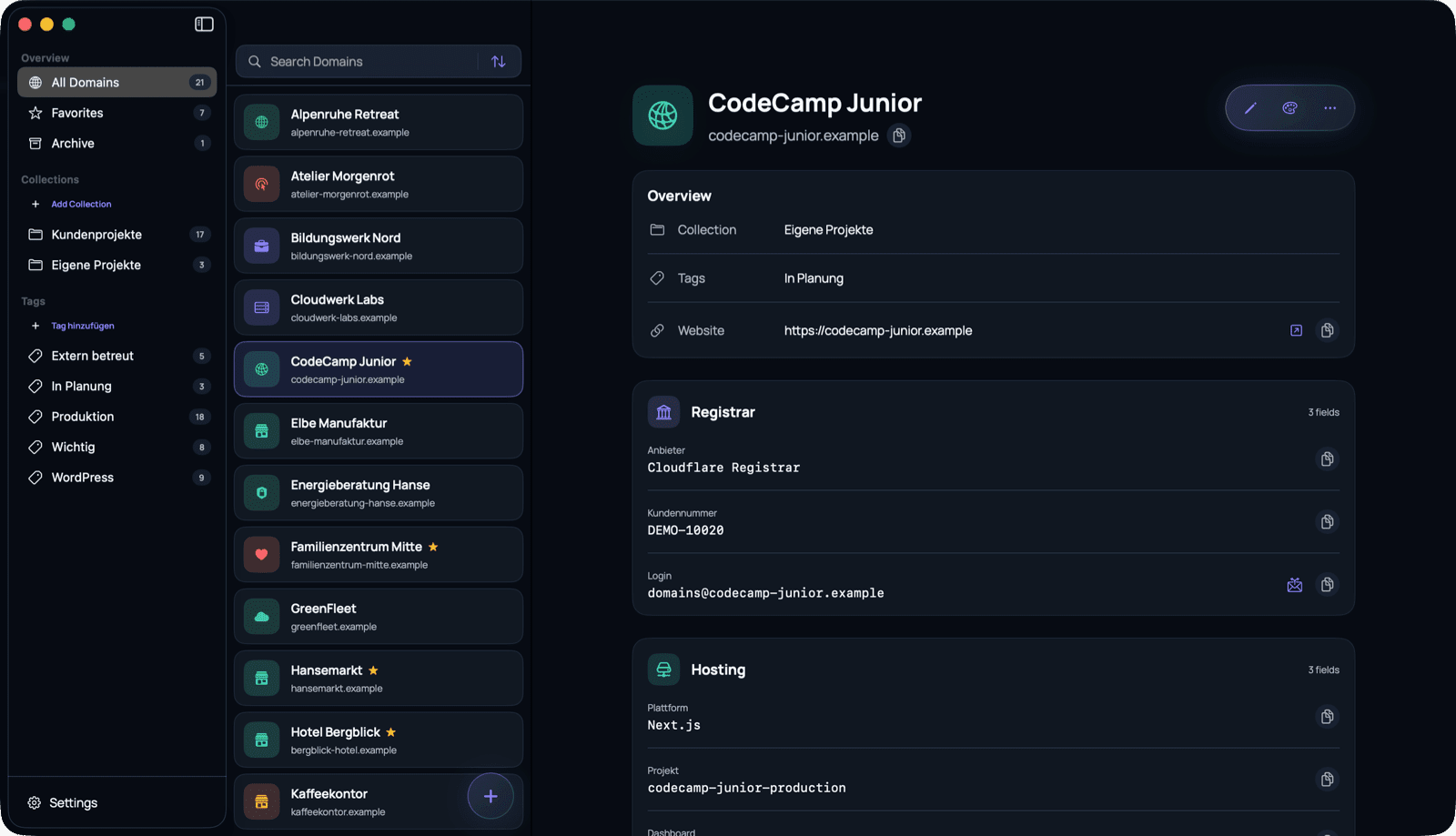
Everything in view
From the first domain name to the last SSH credential, Domain Ledger gives every detail its proper place.
Manage domain names, websites, collections, tags, favorites and notes in one place.
Group, tag, search, sort, favorite and archive domains.
Ready-made sections for registrars, hosting, servers, FTP, SFTP, SSH, databases, CMS, email, contacts and notes.
Text, username, password, URL, email, phone, date, note, selection and yes/no.
Colors and symbols make domains instantly distinguishable and large portfolios easier to scan.
Reveal or copy confidential values when needed without interrupting your workflow.
Straightforward security
Passwords and sensitive fields are encrypted with AES-256-GCM. Everything stays locally on your Mac – without unnecessary data transmission and with a focus on your privacy.
Encryption
AES-256-GCM
Adapts to you
Use clearly defined sections to map your own infrastructure in a structured way.
Client projects · Active
Internal projects · Development
Own projects · In planning
Portable and independent
Export all data, including confidential fields, as a password-protected .dledgerarchive and import it on another Mac.
Good to know
No. Domain Ledger works entirely locally and offline on your Mac. No sign-in is required, the app does not use tracking and does not transfer your stored data to a mandatory cloud service.
No. Domain Ledger is a management and documentation solution. Automatic monitoring is not part of the app.
Yes. The complete vault can be exported and imported as an encrypted, password-protected .dledger archive.
No. Domain Ledger works independently of registrars and hosting providers.
Domain Ledger is a native macOS app and is available in German and English.
Before the first launch
Domain Ledger is currently not signed with an Apple Developer certificate. macOS will therefore block the app the first time you open it.


